
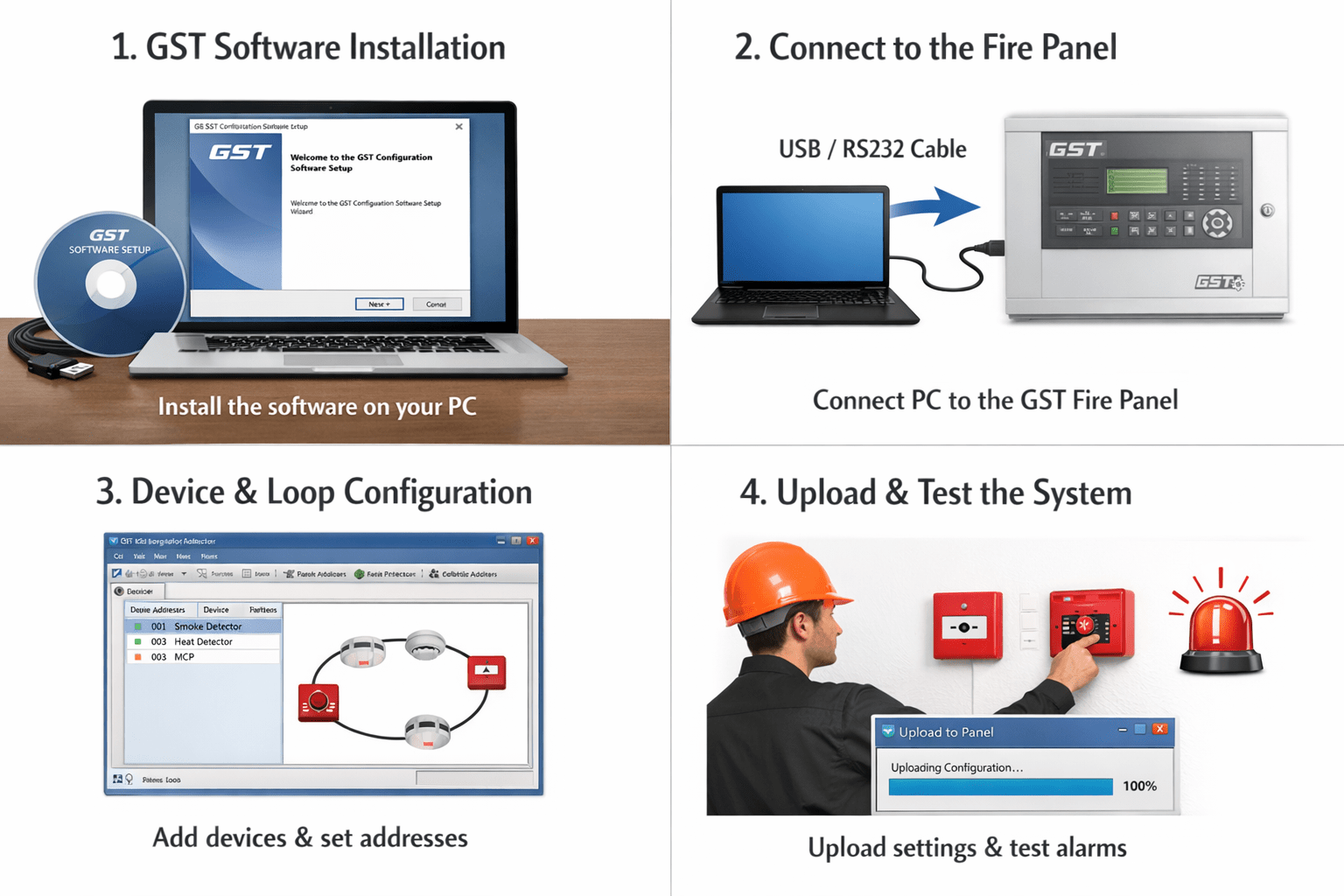
GST Fire Panel Software Configuration 2026 Aaj ke time me fire safety systems har building ke liye mandatory ho chuke hain. GST fire alarm panel ek advanced system hai jo fire detection aur alarm ke liye use hota hai. Lekin iska sahi configuration aur programming bahut important hota hai.
Is article me hum aapko GST fire panel software configuration ka complete process step-by-step Hinglish me samjhayenge, jisse aap easily installation aur setup kar sakte hain.
GST Fire Panel Kya Hota Hai?
GST (Gulf Security Technology) fire panel ek intelligent fire alarm control panel hota hai jo smoke detectors, heat detectors aur manual call points ke through fire detect karta hai.
Yeh system mainly use hota hai:
- Commercial buildings
- Hospitals
- Malls
- Factories
- Offices
GST Fire Panel Configuration ke Liye Required Tools
Configuration start karne se pehle aapke paas yeh cheeze honi chahiye:
- Laptop/Computer
- GST configuration software
- USB/Serial communication cable
- Fire panel (GST model)
- Power supply
GST Fire Panel Software Installation Kaise Kare
Step 1 – Software Install Kare
- GST official software download kare
- Setup file open kare
- Installation process complete kare
- Software ko open kare
Step 2 – Panel se Connection Kare
- Panel ko ON kare
- USB ya serial cable connect kare
- Software me COM port select kare
- “Connect” button press kare
GST Fire Panel Configuration Process
Step 3 – New Project Create Kare
- Software open kare
- “New Project” select kare
- Panel model choose kare
- Project name save kare
Step 4 – Loop Configuration Kare
Loop configuration sabse important step hota hai.
Process:
- Loop number select kare
- Devices add kare (detector, MCP, module)
- Address assign kare
- Device type select kare
Step 5 – Device Addressing
Har device ka unique address hona chahiye.
Example:
- Smoke detector – Address 001
- Heat detector – Address 002
- MCP – Address 003
Step 6 – Zone Configuration Kare
Zones define karne se monitoring easy hoti hai.
Example:
- Zone 1 – Ground Floor
- Zone 2 – First Floor
- Zone 3 – Basement
Step 7 – Cause & Effect Programming
Yeh step alarm logic set karta hai.
Example:
- Smoke detect → Siren ON
- MCP press → Full building alarm
Configuration Upload Kaise Kare
Step 8 – Data Upload to Panel
- “Upload to Panel” option select kare
- Configuration send kare
- Process complete hone ka wait kare
GST Fire Panel Testing aur Commissioning
Step 9 – System Testing Kare
- Smoke detector test kare
- MCP press kare
- Alarm check kare
- Siren working verify kare
Step 10 – Final Commissioning
- Sab devices check kare
- Fault errors clear kare
- Final report prepare kare
Common Errors aur Solutions
Panel connect nahi ho raha
- COM port check kare
- Cable verify kare
Device detect nahi ho raha
- Wiring check kare
- Address correct kare
Fault show ho raha hai
- Loop break ho sakta hai
- Device faulty ho sakta hai
Important Safety Tips
- Installation trained technician se karwaye
- Wiring standard follow kare
- Regular maintenance kare
- Backup power check kare
GST Fire Panel Configuration ke Fayde
- Accurate fire detection
- Fast alarm response
- Easy monitoring
- Safety compliance
Future Maintenance Tips
- Monthly testing kare
- Logs check kare
- Software update rakhe
- Device cleaning kare
Quick Summary
- Software install kare
- Panel connect kare
- Loop aur device configure kare
- Upload kare
- Testing aur commissioning kare
Conclusion
GST fire panel software configuration ek technical process hai, lekin agar aap step-by-step guide follow kare to ise easily complete kiya ja sakta hai. Proper configuration se system reliable aur efficient ban jata hai.
Fire safety me compromise nahi karna chahiye, isliye hamesha system ko properly setup aur maintain kare.
FAQ Section
Q1: Kya GST panel configuration mobile se ho sakta hai?
👉 Nahi, laptop/PC required hota hai.
Q2: Kitna time lagta hai configuration me?
👉 1–3 hours depending on system size.
Q3: Kya bina software ke configuration possible hai?
👉 Nahi, software required hota hai.