
🔌 RJ45 Connection Kya Hai? Complete Guide
🔥 Introduction
Aaj ke digital world me networking har jagah use ho rahi hai — chahe wo home internet ho, office LAN ho, CCTV system ho ya fire alarm system integration. In sab systems ka backbone hota hai RJ45 connection.
RJ45 ek standard connector hai jo Ethernet cables ke through data transmission ke liye use hota hai. Agar aap networking, CCTV, ya fire alarm system me kaam karte ho, toh RJ45 wiring aur connection ka knowledge hona bahut zaroori hai.
Is detailed guide me hum RJ45 ke baare me basic se advanced level tak sab kuch cover karenge, including:
- RJ45 kya hota hai
- Wiring standards (T568A & T568B)
- Connection kaise banaye
- Straight vs cross cable
- Practical use cases
- Troubleshooting
- Diagram explanation
📌 RJ45 Kya Hota Hai?
RJ45 ka full form hai Registered Jack 45. Yeh ek standard 8-pin connector hota hai jo Ethernet networking me use hota hai.
👉 Simple language me:
RJ45 ek plug hai jo LAN cable ke end par lagta hai aur network devices ko connect karta hai.
🔑 Key Features:
- 8 pins (8P8C – 8 Position 8 Contact)
- Plastic connector
- Locking clip
- Fast data transmission support
🧩 RJ45 Cable Ke Components
RJ45 connection banane ke liye aapko kuch basic tools aur components chahiye:
1. 📡 LAN Cable
- Cat5e
- Cat6
- Cat6a
2. 🔌 RJ45 Connector
- Male connector
- Transparent plastic
3. 🛠️ Crimping Tool
- Connector press karne ke liye
4. 📟 Cable Tester
- Connection check karne ke liye
🎨 RJ45 Wiring Standards (Important Section)
RJ45 wiring me 2 main standards use hote hain:
🟧 T568A Standard
🟩 T568B Standard (Most Popular)
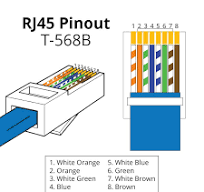
🔢 RJ45 Color Code (T568B – Most Used)
Pin order (left to right, clip neeche):
- White Orange
- Orange
- White Green
- Blue
- White Blue
- Green
- White Brown
- Brown
✏️ RJ45 Wiring Diagram (Hand Sketch)
        RJ45 Connector (Front View)
        -------------------------
        |1|2|3|4|5|6|7|8|
        -------------------------
         | | | | | | | |
         WO O WG B WB G WB BRColor Code:
WO = White Orange
O  = Orange
WG = White Green
B  = Blue
WB = White Blue
G  = Green
WB = White Brown
BR = Brown
🔄 Straight Cable vs Cross Cable
🔹 Straight Cable
- Same standard dono side (T568B – T568B)
- Use: PC → Switch / Router
🔹 Cross Cable
- Ek side T568A, dusri side T568B
- Use: PC → PC
🛠️ RJ45 Connection Kaise Banaye (Step-by-Step Guide)
Step 1: Cable Strip Karein
- Outer jacket remove karein (~1 inch)
Step 2: Wires Straight Karein
- 8 wires ko seedha karein
Step 3: Color Code Arrange Karein
- T568B sequence follow karein
Step 4: Length Cut Karein
- Sab wires equal length me cut karein
Step 5: Connector Me Insert Karein
- RJ45 ke andar push karein
Step 6: Crimping Karein
- Crimping tool se press karein
Step 7: Testing Karein
- Cable tester se check karein
📡 RJ45 Connection Ka Use Kahan Hota Hai?
💻 Computer Networking
- LAN connection
- Office network
🌐 Internet Connection
- Router se PC connection
📷 CCTV Systems
- IP camera connection
🔥 Fire Alarm Systems
- Network-based panels
🖥️ Servers & Data Centers
- High-speed networking
⚡ RJ45 Connection Ke Advantages
- Fast data transfer (up to Gbps)
- Stable connection
- Low interference
- Easy installation
- Cost-effective
⚠️ Common Mistakes (Avoid These)
- Wrong color sequence
- Loose crimping
- Damaged wires
- Improper insertion
- No testing
🔧 Troubleshooting Guide
❌ No Network
👉 Check: Wiring sequence + crimping
❌ Slow Speed
👉 Check: Cable type (Cat5 vs Cat6)
❌ Intermittent Connection
👉 Check: Loose connector
❌ No Light on Port
👉 Check: Cable tester use karein
🔍 RJ45 vs RJ11 Difference
| Feature | RJ45 | RJ11 |
|---|---|---|
| Pins | 8 | 4/6 |
| Use | Networking | Telephone |
| Speed | High | Low |
📊 Advanced Tips (Professional Use)
- Shielded cable (STP) use karein
- Long distance me Cat6 use karein
- Proper cable management karein
- Patch panel use karein
🏁 Conclusion
RJ45 connection networking ka backbone hai. Chahe aap beginner ho ya professional, agar aap sahi wiring aur crimping technique follow karte ho, toh aap ek reliable aur high-speed network easily create kar sakte ho.
Is guide me aapne RJ45 ke baare me complete knowledge gain ki — basics se lekar advanced level tak.



Leave a Reply